

반응형
Notice
Recent Posts
Recent Comments
Link
| 일 | 월 | 화 | 수 | 목 | 금 | 토 |
|---|---|---|---|---|---|---|
| 1 | 2 | 3 | 4 | 5 | 6 | |
| 7 | 8 | 9 | 10 | 11 | 12 | 13 |
| 14 | 15 | 16 | 17 | 18 | 19 | 20 |
| 21 | 22 | 23 | 24 | 25 | 26 | 27 |
| 28 | 29 | 30 | 31 |
Tags
- 알고리즘
- 회고
- react
- Git
- 리눅스
- typescript
- 생각정리
- mongoose
- Java
- mongo
- js
- 피드백
- 네트워크
- CS
- 트러블슈팅
- mysql
- nest.js
- 생각일기
- 자바스크립트
- 생각로그
- WIL
- next.js
- 코테
- MongoDB
- til
- array
- 주간회고
- Grafana
- javascript
- 기록
Archives
- Today
- Total
코딩일상
[nest.js] nest.js 뿌수기 공식 docs 모조리 파헤치기[Middleware] 본문
반응형

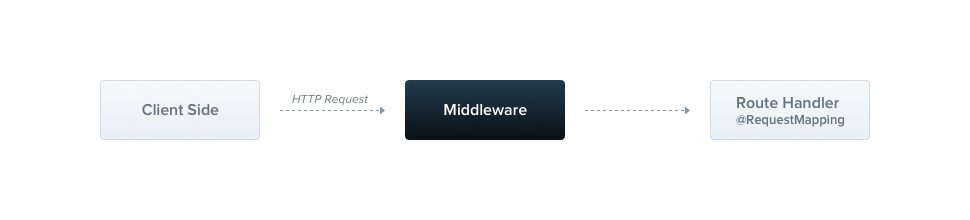
1. Middleware의 본질
Middleware는 요청-응답 사이클에서 라우트 핸들러가 실행되기 전에 호출되는 함수입니다. Express의 middleware와 동일한 개념이며, NestJS는 Express 위에 구축되어 있어 Express middleware를 그대로 사용할 수 있습니다.
공항 보안 검색대를 생각해보세요:

승객(Request) → 보안검색(Middleware 1) → 세관검사(Middleware 2) → 탑승구(Controller)
                    ↓                        ↓
              위험물 차단              서류 확인
각 middleware는 다음 작업을 수행할 수 있습니다:
- 요청/응답 객체에 접근 및 수정
- 요청-응답 사이클 종료
- 스택의 다음 middleware 호출 (next())
- 다음 middleware를 호출하지 않으면 요청이 중단됨
2. Middleware 구현 방법
2.1 함수형 Middleware (Function Middleware)
가장 간단한 형태
// logger.middleware.ts
import { Request, Response, NextFunction } from 'express';

export function logger(req: Request, res: Response, next: NextFunction) {
  console.log(`[${new Date().toISOString()}] ${req.method} ${req.url}`);
  next(); // 반드시 호출해야 다음 단계로 진행
}
실제 사용 예시 - API 호출 시간 측정
// performance.middleware.ts
export function performanceLogger(req: Request, res: Response, next: NextFunction) {
  const startTime = Date.now();

  // 응답이 완료되면 실행
  res.on('finish', () => {
    const duration = Date.now() - startTime;
    console.log(`${req.method} ${req.url} - ${duration}ms - ${res.statusCode}`);
  });

  next();
}
2.2 클래스 기반 Middleware (Class Middleware)
의존성 주입이 필요한 경우
// auth.middleware.ts
import { Injectable, NestMiddleware } from '@nestjs/common';
import { Request, Response, NextFunction } from 'express';
import { JwtService } from '@nestjs/jwt';

@Injectable()
export class AuthMiddleware implements NestMiddleware {
  constructor(private jwtService: JwtService) {} // DI 가능!

  async use(req: Request, res: Response, next: NextFunction) {
    const token = req.headers.authorization?.split(' ')[1];

    if (!token) {
      return res.status(401).json({ message: 'Token required' });
    }

    try {
      const payload = await this.jwtService.verifyAsync(token);
      req['user'] = payload; // Request 객체에 사용자 정보 추가
      next();
    } catch (error) {
      return res.status(401).json({ message: 'Invalid token' });
    }
  }
}
실제 사용 예시 - Request ID 생성기
// request-id.middleware.ts
import { Injectable, NestMiddleware } from '@nestjs/common';
import { v4 as uuidv4 } from 'uuid';

@Injectable()
export class RequestIdMiddleware implements NestMiddleware {
  use(req: Request, res: Response, next: NextFunction) {
    const requestId = uuidv4();
    req['id'] = requestId;
    res.setHeader('X-Request-ID', requestId);
    next();
  }
}
3. Middleware 적용 방법
3.1 모듈 단위 적용
// app.module.ts
import { Module, NestModule, MiddlewareConsumer, RequestMethod } from '@nestjs/common';
import { LoggerMiddleware } from './common/middleware/logger.middleware';
import { AuthMiddleware } from './common/middleware/auth.middleware';
import { CatsModule } from './cats/cats.module';

@Module({
  imports: [CatsModule],
})
export class AppModule implements NestModule {
  configure(consumer: MiddlewareConsumer) {
    // 1. 특정 경로에만 적용
    consumer
      .apply(LoggerMiddleware)
      .forRoutes('cats');

    // 2. HTTP 메서드 지정
    consumer
      .apply(AuthMiddleware)
      .forRoutes({ path: 'cats', method: RequestMethod.POST });

    // 3. 여러 middleware 체인
    consumer
      .apply(LoggerMiddleware, AuthMiddleware)
      .forRoutes(CatsController);

    // 4. 특정 경로 제외
    consumer
      .apply(LoggerMiddleware)
      .exclude(
        { path: 'cats', method: RequestMethod.GET },
        { path: 'cats/(.*)', method: RequestMethod.POST },
        'cats/(.*)', // 와일드카드 지원
      )
      .forRoutes(CatsController);

    // 5. 모든 경로에 적용
    consumer
      .apply(LoggerMiddleware)
      .forRoutes('*');
  }
}
3.2 실제 프로젝트 구조 예시
// app.module.ts
@Module({
  imports: [
    AuthModule,
    UsersModule,
    VehiclesModule,
    ChargingModule,
  ],
})
export class AppModule implements NestModule {
  configure(consumer: MiddlewareConsumer) {
    // 1. 모든 요청에 로깅
    consumer
      .apply(RequestLoggerMiddleware)
      .forRoutes('*');

    // 2. API 경로만 인증 체크
    consumer
      .apply(JwtAuthMiddleware)
      .exclude(
        { path: 'auth/login', method: RequestMethod.POST },
        { path: 'auth/register', method: RequestMethod.POST },
        { path: 'health', method: RequestMethod.GET },
      )
      .forRoutes({ path: 'api/*', method: RequestMethod.ALL });

    // 3. 관리자 경로만 관리자 권한 체크
    consumer
      .apply(AdminAuthMiddleware)
      .forRoutes({ path: 'admin/*', method: RequestMethod.ALL });

    // 4. Rate limiting for public APIs
    consumer
      .apply(RateLimitMiddleware)
      .forRoutes(
        { path: 'api/public/*', method: RequestMethod.ALL },
      );
  }
}
4. 고급 패턴 및 실전 예시
4.1 Request Context 관리
// context.middleware.ts
import { Injectable, NestMiddleware } from '@nestjs/common';
import { ClsService } from 'nestjs-cls'; // 또는 AsyncLocalStorage 사용

@Injectable()
export class ContextMiddleware implements NestMiddleware {
  constructor(private cls: ClsService) {}

  use(req: Request, res: Response, next: NextFunction) {
    // 요청 전체에서 사용 가능한 context 설정
    this.cls.run(() => {
      this.cls.set('requestId', req['id']);
      this.cls.set('userId', req['user']?.id);
      this.cls.set('timestamp', new Date());
      next();
    });
  }
}
4.2 CORS 커스텀 Middleware
// cors.middleware.ts
@Injectable()
export class CustomCorsMiddleware implements NestMiddleware {
  use(req: Request, res: Response, next: NextFunction) {
    const allowedOrigins = [
      'https://pmgrow.com',
      'https://admin.pmgrow.com',
    ];

    const origin = req.headers.origin;

    if (allowedOrigins.includes(origin)) {
      res.setHeader('Access-Control-Allow-Origin', origin);
      res.setHeader('Access-Control-Allow-Credentials', 'true');
      res.setHeader('Access-Control-Allow-Methods', 'GET,POST,PUT,DELETE,OPTIONS');
      res.setHeader('Access-Control-Allow-Headers', 'Content-Type,Authorization');
    }

    // Preflight request 처리
    if (req.method === 'OPTIONS') {
      return res.sendStatus(204);
    }

    next();
  }
}
4.3 Request Body 검증 및 변환
// sanitize.middleware.ts
@Injectable()
export class SanitizeMiddleware implements NestMiddleware {
  use(req: Request, res: Response, next: NextFunction) {
    if (req.body) {
      // XSS 방지: HTML 태그 제거
      this.sanitizeObject(req.body);
    }
    next();
  }

  private sanitizeObject(obj: any) {
    for (const key in obj) {
      if (typeof obj[key] === 'string') {
        // 간단한 HTML 태그 제거 (실제로는 DOMPurify 등 사용 권장)
        obj[key] = obj[key].replace(/<script\b[^<]*(?:(?!<\/script>)<[^<]*)*<\/script>/gi, '');
        obj[key] = obj[key].trim();
      } else if (typeof obj[key] === 'object') {
        this.sanitizeObject(obj[key]);
      }
    }
  }
}
4.4 Rate Limiting Middleware
// rate-limit.middleware.ts
import { Injectable, NestMiddleware, HttpException, HttpStatus } from '@nestjs/common';
import { RedisService } from '../redis/redis.service';

@Injectable()
export class RateLimitMiddleware implements NestMiddleware {
  constructor(private redisService: RedisService) {}

  async use(req: Request, res: Response, next: NextFunction) {
    const ip = req.ip;
    const key = `rate-limit:${ip}`;
    const limit = 100; // 100 requests
    const window = 60; // per 60 seconds

    const current = await this.redisService.get(key);

    if (!current) {
      await this.redisService.setex(key, window, '1');
      return next();
    }

    const count = parseInt(current);

    if (count >= limit) {
      throw new HttpException(
        'Too many requests',
        HttpStatus.TOO_MANY_REQUESTS,
      );
    }

    await this.redisService.incr(key);
    next();
  }
}
4.5 데이터베이스 트랜잭션 컨텍스트
// transaction.middleware.ts
@Injectable()
export class TransactionMiddleware implements NestMiddleware {
  constructor(private dataSource: DataSource) {}

  async use(req: Request, res: Response, next: NextFunction) {
    const queryRunner = this.dataSource.createQueryRunner();
    await queryRunner.connect();
    await queryRunner.startTransaction();

    req['queryRunner'] = queryRunner;

    res.on('finish', async () => {
      if (res.statusCode >= 200 && res.statusCode < 300) {
        await queryRunner.commitTransaction();
      } else {
        await queryRunner.rollbackTransaction();
      }
      await queryRunner.release();
    });

    next();
  }
}
5. 글로벌 Middleware
함수형 미들웨어를 전역으로 적용
// main.ts
import { NestFactory } from '@nestjs/core';
import { AppModule } from './app.module';
import { logger } from './common/middleware/logger.middleware';

async function bootstrap() {
  const app = await NestFactory.create(AppModule);

  // 글로벌 미들웨어 적용
  app.use(logger);

  // 여러 개 적용 가능
  app.use(cors());
  app.use(helmet());
  app.use(compression());

  await app.listen(3000);
}
bootstrap();
주의사항:
- app.use()로 적용된 미들웨어는 의존성 주입 사용 불가
- 의존성이 필요하면 모듈의 configure() 메서드에서 적용
6. Middleware vs Guards vs Interceptors
| 특징 | Middleware | Guards | Interceptors |
| 실행 시점 | 라우트 핸들러 이전 | 미들웨어 이후, 핸들러 이전 | 핸들러 전후 |
| 접근 가능 | Request, Response | ExecutionContext | ExecutionContext, 반환값 |
| 용도 | 로깅, CORS, 파싱 | 인증/인가 | 변환, 캐싱, 예외 처리 |
| DI | 제한적 (app.use 시) | 완전 지원 | 완전 지원 |
| 다음 호출 | next() 필수 | true/false 반환 | handle() 호출 |
실행 순서
Request
  ↓
Middleware (global)
  ↓
Middleware (module)
  ↓
Guards (global → controller → route)
  ↓
Interceptors (before)
  ↓
Pipes
  ↓
Route Handler
  ↓
Interceptors (after)
  ↓
Exception Filters
  ↓
Response
7. 실전 프로젝트 예시 - 완전한 구현
프로젝트 구조
src/
├── common/
│   └── middleware/
│       ├── logger.middleware.ts
│       ├── auth.middleware.ts
│       ├── rate-limit.middleware.ts
│       └── request-context.middleware.ts
├── app.module.ts
└── main.ts
통합 예시
// logger.middleware.ts
import { Injectable, NestMiddleware, Logger } from '@nestjs/common';

@Injectable()
export class LoggerMiddleware implements NestMiddleware {
  private logger = new Logger('HTTP');

  use(req: Request, res: Response, next: NextFunction) {
    const { method, originalUrl, ip } = req;
    const userAgent = req.get('user-agent') || '';
    const startTime = Date.now();

    res.on('finish', () => {
      const { statusCode } = res;
      const contentLength = res.get('content-length');
      const duration = Date.now() - startTime;

      this.logger.log(
        `${method} ${originalUrl} ${statusCode} ${contentLength} - ${userAgent} ${ip} - ${duration}ms`
      );
    });

    next();
  }
}
// auth.middleware.ts
import { Injectable, NestMiddleware, UnauthorizedException } from '@nestjs/common';
import { JwtService } from '@nestjs/jwt';
import { UsersService } from '../../users/users.service';

@Injectable()
export class AuthMiddleware implements NestMiddleware {
  constructor(
    private jwtService: JwtService,
    private usersService: UsersService,
  ) {}

  async use(req: Request, res: Response, next: NextFunction) {
    try {
      const token = this.extractTokenFromHeader(req);

      if (!token) {
        throw new UnauthorizedException('Token not provided');
      }

      const payload = await this.jwtService.verifyAsync(token, {
        secret: process.env.JWT_SECRET,
      });

      // 사용자 정보 조회 (선택사항)
      const user = await this.usersService.findOne(payload.sub);

      if (!user) {
        throw new UnauthorizedException('User not found');
      }

      // Request 객체에 사용자 정보 첨부
      req['user'] = user;

      next();
    } catch (error) {
      throw new UnauthorizedException('Invalid token');
    }
  }

  private extractTokenFromHeader(request: Request): string | undefined {
    const [type, token] = request.headers.authorization?.split(' ') ?? [];
    return type === 'Bearer' ? token : undefined;
  }
}
// app.module.ts
import { Module, NestModule, MiddlewareConsumer, RequestMethod } from '@nestjs/common';
import { LoggerMiddleware } from './common/middleware/logger.middleware';
import { AuthMiddleware } from './common/middleware/auth.middleware';
import { RequestContextMiddleware } from './common/middleware/request-context.middleware';
import { RateLimitMiddleware } from './common/middleware/rate-limit.middleware';

@Module({
  imports: [
    UsersModule,
    VehiclesModule,
    ChargingModule,
    AuthModule,
  ],
})
export class AppModule implements NestModule {
  configure(consumer: MiddlewareConsumer) {
    // 1. 모든 요청 로깅
    consumer
      .apply(LoggerMiddleware, RequestContextMiddleware)
      .forRoutes('*');

    // 2. 공개 API Rate Limiting
    consumer
      .apply(RateLimitMiddleware)
      .forRoutes(
        { path: 'auth/login', method: RequestMethod.POST },
        { path: 'auth/register', method: RequestMethod.POST },
      );

    // 3. 보호된 라우트 인증
    consumer
      .apply(AuthMiddleware)
      .exclude(
        // 제외할 경로들
        { path: 'auth/login', method: RequestMethod.POST },
        { path: 'auth/register', method: RequestMethod.POST },
        { path: 'health', method: RequestMethod.GET },
        'docs/(.*)', // API 문서
      )
      .forRoutes({ path: '*', method: RequestMethod.ALL });
  }
}
8. 주의사항 및 Best Practices
8.1 반드시 next() 호출하기
// ❌ 나쁜 예
export class BadMiddleware implements NestMiddleware {
  use(req: Request, res: Response, next: NextFunction) {
    console.log('Processing...');
    // next()를 호출하지 않으면 요청이 멈춤!
  }
}

// ✅ 좋은 예
export class GoodMiddleware implements NestMiddleware {
  use(req: Request, res: Response, next: NextFunction) {
    console.log('Processing...');
    next(); // 반드시 호출
  }
}
8.2 에러 처리
@Injectable()
export class ErrorHandlingMiddleware implements NestMiddleware {
  use(req: Request, res: Response, next: NextFunction) {
    try {
      // 처리 로직
      next();
    } catch (error) {
      // NestJS의 예외 필터로 전달
      next(error);
    }
  }
}
8.3 비동기 작업
@Injectable()
export class AsyncMiddleware implements NestMiddleware {
  async use(req: Request, res: Response, next: NextFunction) {
    try {
      await someAsyncOperation();
      next();
    } catch (error) {
      next(error);
    }
  }
}
8.4 성능 고려사항
// ❌ 나쁜 예: 모든 요청마다 DB 조회
@Injectable()
export class SlowMiddleware implements NestMiddleware {
  async use(req: Request, res: Response, next: NextFunction) {
    const config = await this.configRepository.findOne(); // 매번 DB 조회
    req['config'] = config;
    next();
  }
}

// ✅ 좋은 예: 캐싱 활용
@Injectable()
export class FastMiddleware implements NestMiddleware {
  private configCache: any;

  async use(req: Request, res: Response, next: NextFunction) {
    if (!this.configCache) {
      this.configCache = await this.configRepository.findOne();
    }
    req['config'] = this.configCache;
    next();
  }
}
9. 요약 및 언제 사용할까?
상기에 대한 더 자세한 이유는 다음 포스팅에서 만들어가 보겠다.
Middleware를 사용해야 하는 경우
- ✅ 모든 요청에 대한 로깅
- ✅ CORS 설정
- ✅ Request/Response 객체 직접 조작
- ✅ 라우트 핸들러 실행 전 전처리
- ✅ Body 파싱, 압축, 보안 헤더 설정
Guards를 사용해야 하는 경우
- ✅ 인증/인가 (권한 체크)
- ✅ 특정 조건에서 라우트 접근 차단
- ✅ ExecutionContext 필요시
Interceptors를 사용해야 하는 경우
- ✅ 응답 데이터 변환
- ✅ 캐싱
- ✅ 성능 측정
- ✅ 응답 후 추가 작업
반응형
'개발 공부 > nest.js' 카테고리의 다른 글
| [nest.js] NestJS 제공 라이브러리 및 데코레이터 완벽 정리 (0) | 2025.12.14 |
|---|---|
| [nest.js] Middleware vs Guards vs Interceptors (0) | 2025.12.14 |
| [nest.js] nest.js 뿌수기 공식 docs 모조리 파헤치기[Modules] (0) | 2025.12.11 |
| [nest.js] nest.js 뿌수기 공식 docs 모조리 파헤치기[providers]Constructor-based Injection vs Property-based Injection (0) | 2025.12.11 |
| [nest.js] MongoDB연결하기 (0) | 2022.12.05 |
'개발 공부/nest.js' Related Articles
more


Comments